SSL certification explained: secure your website and boost trust

Over half of online shoppers will abandon their basket the moment they see a certificate error on a checkout page. That single statistic should reframe how you think about SSL certification. It is not a back-end technicality reserved for developers. It is a direct line to customer confidence, search engine rankings, and ultimately your revenue. This article cuts through the jargon, explains exactly what SSL certification is, how it works, which type suits your business, and what pitfalls to avoid so you can make informed decisions with confidence.
Table of Contents
- What is SSL certification?
- How SSL certificates work: the handshake and encryption
- Types of SSL certificates: choosing the right solution for your business
- Common SSL certificate issues: pitfalls and how to avoid them
- Business benefits of SSL certification: trust, SEO and compliance
- Implementation tips and expert best practices for SMEs
- Secure your website and stay ahead: professional support for SMEs
- Frequently asked questions
Key Takeaways
| Point | Details |
|---|---|
| SSL enables trust | SSL certification makes your website look trustworthy, improves user confidence, and is now expected by online customers. |
| TLS is the modern standard | Despite the name, SSL certificates use TLS encryption to protect your website and should be kept updated. |
| Choose the right type | Most SMEs can rely on free DV certificates, but OV or EV may be necessary for high-trust or compliance-related websites. |
| Automate and monitor | Certificate renewal, monitoring, and proper configuration are key to avoiding costly errors and browser warnings. |
| SSL boosts SEO and compliance | SSL certification not only secures data, but also increases search rankings and ensures regulatory compliance. |
What is SSL certification?
An SSL certificate is a digital file that enables encrypted HTTPS connections between a web server and a visitor’s browser. Think of it as a verified identity badge for your website. When a visitor lands on your site, the certificate confirms your site is legitimate and ensures that any data exchanged, such as passwords or payment details, is scrambled so third parties cannot read it.
It is worth clarifying the terminology. SSL (Secure Sockets Layer) is the original protocol from the 1990s and is now deprecated. The modern standard is TLS (Transport Layer Security), but the industry still uses “SSL” as shorthand. When someone says SSL certificate, they almost always mean a TLS certificate.
The visible proof of certification is the padlock icon and the “https://” prefix in your browser’s address bar. For SMEs, this matters for three reasons:
- Trust: Visitors immediately recognise the padlock as a safety signal
- Compliance: Regulations such as GDPR and PCI-DSS require encrypted data transmission
- SEO: Google uses HTTPS as a ranking signal, giving certified sites a measurable edge
“Without SSL certification, your website is broadcasting customer data in plain text, the digital equivalent of shouting credit card numbers across a crowded room.”
Understanding the full benefits of SSL certificates for small businesses goes well beyond the padlock icon.
How SSL certificates work: the handshake and encryption
The process that secures your website begins with something called the TLS handshake. It sounds complex, but the logic is straightforward. Here is how it unfolds:
- Client hello: Your visitor’s browser sends a message to your server listing the encryption methods it supports
- Server hello: Your server responds, selects an encryption method, and presents its SSL certificate
- Certificate verification: The browser checks the certificate against a trusted Certificate Authority (CA) to confirm it is valid
- Session key exchange: Both parties agree on a temporary session key using asymmetric encryption
- Secure session begins: All subsequent data is encrypted using faster symmetric encryption
TLS 1.3 is the current standard, offering faster handshakes and stronger privacy protections than its predecessors. It eliminates several outdated cipher suites that were vulnerable to attack, making your site both quicker and more secure.
Once the handshake completes, symmetric encryption takes over. This is significantly faster than asymmetric encryption and keeps the session efficient without sacrificing security. The TLS/SSL handshake process is designed to be invisible to your visitors, completing in milliseconds.
Browser warnings appear when something breaks this chain. An expired certificate, a mismatched domain name, or an untrusted CA will all trigger a red warning screen. Most visitors will not click past it. Pairing solid SSL configuration with safe SEO practices ensures your site performs well in both security and search rankings.

Pro Tip: Use SSL Labs’ free testing tool to check your server’s TLS configuration and identify any weaknesses before your visitors encounter them.
Types of SSL certificates: choosing the right solution for your business
Not all SSL certificates are equal. Certificate types by validation fall into three main categories, each suited to different business needs.
| Certificate type | Validation level | Best for | Cost |
|---|---|---|---|
| Domain Validated (DV) | Domain ownership only | Blogs, brochure sites, most SMEs | Free to low cost |
| Organisation Validated (OV) | Domain + business identity | Professional services, B2B sites | Moderate |
| Extended Validation (EV) | Full legal verification | E-commerce, finance, high-trust sectors | Higher cost |
For most SMEs, a DV certificate is perfectly adequate. Free options such as Let’s Encrypt are automated, widely trusted, and renew every 90 days without manual intervention. The certificate benefits for SMEs are immediate and tangible even at the DV level.
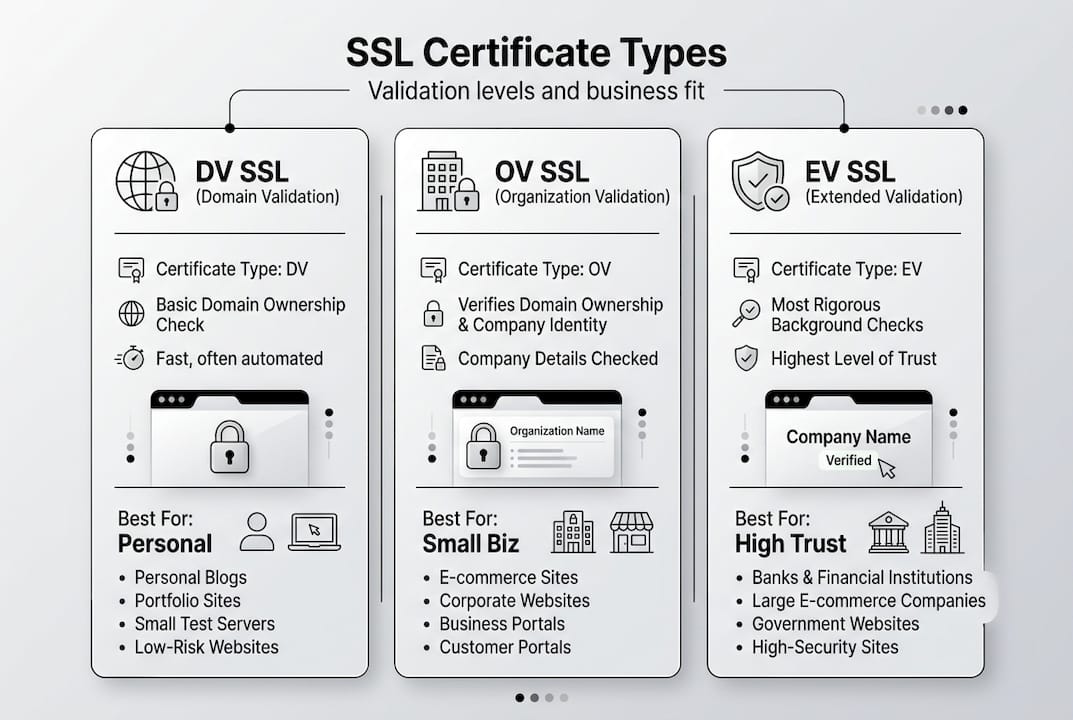
If your business handles sensitive client data or operates in a regulated sector, an OV or EV certificate adds a visible layer of credibility. EV certificates historically displayed a green address bar with your company name, though modern browsers have scaled this back.
For businesses running multiple subdomains or separate domains, consider these options:
- Wildcard certificates: Cover a primary domain and all its subdomains (e.g., shop.yourbusiness.co.uk, blog.yourbusiness.co.uk)
- SAN certificates (Subject Alternative Names): Cover multiple distinct domains under one certificate
- Multi-year certificates: Reduce administrative overhead, though automation is generally the smarter long-term approach
Pro Tip: If you are using a managed hosting platform or a reputable web developer, ask whether automated certificate renewal is already configured. Many SMEs discover their certificate has lapsed simply because no one set up auto-renewal.
Common SSL certificate issues: pitfalls and how to avoid them
Even with a valid certificate in place, things can go wrong. Expired or revoked certificates trigger browser warnings that are alarming to visitors and damaging to your reputation. Worse, certificate errors cause over 50% cart abandonment in e-commerce, meaning a lapsed certificate can cost you real revenue within hours.
Here are the most common causes of SSL errors:
- Expired certificates: The most frequent issue; easily prevented with automated renewal
- Domain mismatch: The certificate is issued for www.yourbusiness.co.uk but the site loads on yourbusiness.co.uk without a redirect
- Broken trust chain: Intermediate certificates are missing from the server configuration
- Self-signed certificates: Generated without a trusted CA; browsers will always warn visitors
- Mixed content: HTTPS pages loading HTTP resources (images, scripts) which undermines the secure connection
| Issue | Visitor impact | Fix |
|---|---|---|
| Expired certificate | Full browser warning page | Automate renewal via Let’s Encrypt or CA |
| Domain mismatch | Security warning | Ensure certificate covers all domain variants |
| Mixed content | Padlock broken or absent | Update all resource URLs to HTTPS |
| Broken trust chain | Browser error | Install full certificate chain on server |
“A single lapsed certificate can undo months of trust-building with your audience. Treat renewal like a utility bill, not an optional task.”
Regular HTTPS security audits catch these issues before they affect customers. Combining certificate monitoring with periodic SSL and SEO audits gives you a complete picture of your site’s health.
Business benefits of SSL certification: trust, SEO and compliance
SSL certification delivers measurable returns across three areas that matter most to SMEs: customer trust, search visibility, and regulatory compliance.
On the trust front, the padlock icon is one of the most recognised safety symbols online. Visitors notice its absence immediately. For service businesses and e-commerce sites alike, that visual cue influences purchasing decisions before a single word of your copy is read.
For search visibility, HTTPS boosts SEO as a confirmed Google ranking factor. While it is not the most powerful signal in the algorithm, it is a baseline requirement. Sites without HTTPS are actively disadvantaged. Understanding why SEO matters for small businesses makes the case for treating SSL as a non-negotiable foundation.
On compliance, TLS is mandatory under PCI-DSS for any site processing card payments, and GDPR requires appropriate technical measures to protect personal data in transit. Failing to meet these standards exposes your business to fines and reputational damage.
Key business benefits at a glance:
- Increased visitor confidence and lower bounce rates
- Improved search engine rankings across Google and Bing
- Compliance with GDPR, PCI-DSS, and other data protection frameworks
- Protection of customer data during transmission
- Reduced risk of phishing impersonation (particularly with OV/EV certificates)
Pro Tip: SSL certification protects data in transit only. It does not secure your site’s database, server files, or login systems. Pair it with strong passwords, regular backups, and a web application firewall for complete protection. Explore the full SEO benefits of a properly secured and optimised site.
Implementation tips and expert best practices for SMEs
Getting SSL certification right from the start saves you from costly fixes later. Here are the steps we recommend for SMEs:
- Choose TLS 1.3: Configure your server to prioritise TLS 1.3 and disable SSL and TLS versions below 1.2, which are vulnerable to known exploits
- Automate renewal: Use Let’s Encrypt with a tool like Certbot to handle 90-day renewals automatically
- Enable HSTS: HTTP Strict Transport Security tells browsers to always use HTTPS for your domain, preventing downgrade attacks
- Enable OCSP stapling: This speeds up certificate validation by allowing your server to provide proof of certificate validity directly, rather than requiring the browser to check with the CA
- Test your configuration: Run your domain through SSL Labs’ free grading tool to identify weaknesses
- Use a reputable CA: Stick to well-known Certificate Authorities such as DigiCert, Sectigo, or Let’s Encrypt
According to best practice TLS configuration guidance, prioritising TLS 1.3, enabling HSTS and OCSP stapling, and monitoring via SSL Labs represents the gold standard for SME web security in 2026.
Additional recommendations:
- Redirect all HTTP traffic to HTTPS using a 301 permanent redirect
- Ensure your sitemap and canonical tags reference HTTPS URLs
- Check that third-party scripts and fonts load over HTTPS to avoid mixed content warnings
Pro Tip: Implementing these settings correctly can also boost your Google rankings by signalling a technically sound, trustworthy site to search engines.
Secure your website and stay ahead: professional support for SMEs
Getting SSL certification configured correctly is one piece of a larger puzzle. For business owners who want to ensure their site is secure, fast, and visible in search results, professional support removes the guesswork entirely.

At Kickass Online, we handle SSL configuration as part of our broader website maintenance services, ensuring your certificates are always current, your server is correctly configured, and your site meets the latest security standards. We also stay across web development trends so your site remains competitive as technology evolves. Pair that with a tailored SEO strategy and you have a site that not only protects your customers but actively attracts new ones. We work with a limited number of clients at a time, which means you get genuine attention, not a templated solution.
Frequently asked questions
Do I need an SSL certificate for a small business site?
Yes. SSL certification is essential for any site that collects customer information, and HTTPS boosts SEO as a confirmed Google ranking factor, making it a baseline requirement for visibility as well as trust.
Is SSL certification the same as TLS?
Not exactly. SSL is deprecated and no longer used in practice; modern certificates use TLS, but the term “SSL” persists as industry shorthand for the same concept.
What happens if my certificate expires?
Expired certificates trigger browser warnings that deter visitors immediately, and the resulting drop in traffic and trust can lead to lost sales and lower search rankings.
Are free DV certificates safe for SMEs?
Free DV certificates provide solid encryption and are adequate for most SMEs, but EV certificates are better suited to high-trust e-commerce or compliance-heavy environments where visible business verification matters.
Does an SSL certificate stop hackers?
No. SSL certificates encrypt data in transit but do not protect your site’s server, database, or application layer; additional security measures such as firewalls, regular updates, and access controls are essential.
Recommended

Book A Discovery Call
Stay Connected